
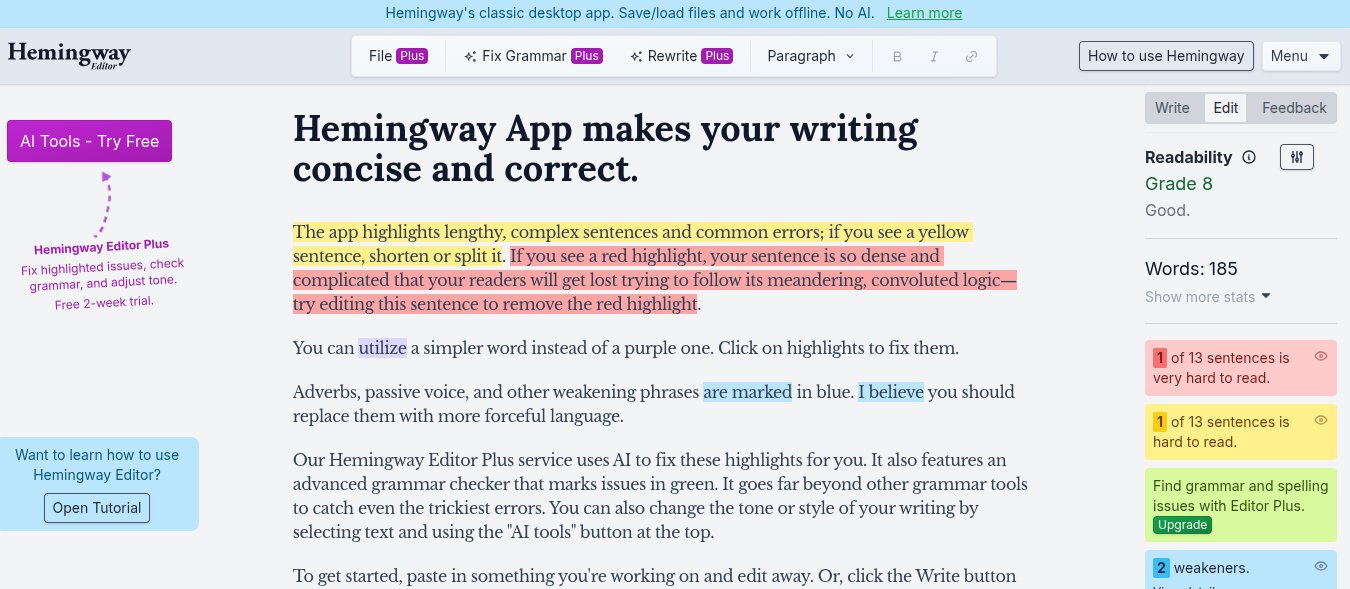
If you write blogs, emails, or web content regularly, you’ve probably heard about Hemingway Editor. It’s often described as a tool that “makes your writing bold and clear.”
I was curious but also a bit sceptical.
So instead of trusting hype, I actually used Hemingway Editor on my own drafts to see what it really does and whether it’s worth adding to a writing workflow.
This is not a promotional review. It’s simple experience what worked, what didn’t, and who should (or shouldn’t) use it.
What Is Hemingway Editor
Hemingway Editor is a writing clarity tool. It doesn’t help you generate content like AI tools. It doesn’t check SEO. It doesn’t rewrite text creatively.
Its job is very specific:
To highlight parts of your writing that may be hard to read and suggest simplifications.
That’s it.
You paste your text, and the editor highlights:
- Long or complex sentences
- Passive voice
- Excessive adverbs
- Hard-to-read phrases
- Overall readability grade
No sign-ups needed for the web version. Just paste and analyse.
Why I Decided to Try Hemingway Editor
I write long-form blogs and explainers. Even when content is useful, it can become:
- Too long
- Too complex
- Too “writer-ish”
I wanted a second pair of eyes, not another opinionated tool. Grammarly focuses more on correctness and tone. AI tools rewrite too much.
Hemingway promised something simpler:
“Help me write like a human, not impress with fancy words.”
That’s what made me try it.
My First Impression
The interface is clean. No distractions.
You paste text → problems are highlighted → you decide what to fix.
No pop-ups. No aggressive upgrades.
That alone made it feel calm to use.
The Color Highlights
When I pasted one of my blog drafts, here’s what I saw:
- Yellow highlights – Sentences that are hard to read
- Red highlights – Very hard to read (usually long, layered sentences)
- Blue highlights – Passive voice
- Green highlights – Adverbs
- Purple highlights – Complex words with simpler alternatives
At first, it looked like my writing was “wrong.”
But after using it for a while, I realised something important:
Hemingway doesn’t say your writing is bad.
It just asks, “Can this be simpler?”
How Hemingway Editor Helped My Writing
1. It Exposed My Habit of Writing Long Sentences
I didn’t realise how often I write sentences that go on forever.
Hemingway made this very obvious.
Instead of:
“This tool is useful for writers who want to improve clarity while maintaining their original voice without relying too much on AI rewriting.”
I ended up writing:
“This tool helps writers improve clarity without changing their original voice.”
That’s not magic.
It’s awareness.
2. It Forced Me to Cut Unnecessary Words
Adverbs were my biggest surprise.
Words like:
- very
- really
- basically
- actually
Hemingway kept highlighting them.
Not all adverbs are bad but many were unnecessary. Removing them didn’t weaken my writing. It made it tighter.
3. It Made My Content More Skimmable
After editing with Hemingway:
- Paragraphs became shorter
- Sentences became cleaner
- The flow improved
This is especially helpful for blogs and web content, where people skim more than they read.
4. It Helped Me Write for Real People, Not Writers
Sometimes writers write for other writers.
Hemingway nudged me to write for:
- Readers
- Beginners
- Non-technical audiences
That’s valuable if your goal is clarity, not literary awards.
Where Hemingway Editor Falls Short
This tool is not perfect and it’s important to say that clearly.
1. It Can Oversimplify If You Obey It Blindly
Not every long sentence is bad.
Sometimes:
- Context matters
- Flow matters
- Tone matters
If you fix every red or yellow highlight, your writing can start feeling robotic.
I learned to use Hemingway as a guide, not a rulebook.
2. It Doesn’t Understand Context or Intent
Hemingway doesn’t know:
- Your audience
- Your brand voice
- Your industry
It flags passive voice even when passive voice is intentional.
So you still need judgment.
3. No SEO or Content Strategy Support
If you’re expecting:
- Keyword suggestions
- Content optimisation
- SERP insights
This tool doesn’t do any of that.
Hemingway is strictly about readability, nothing more.
4. The Desktop App Is Paid (Web Version Is Limited)
The free web version is good for editing, but:
- No document saving
- No offline access
The paid app adds features, but whether it’s worth it depends on how often you write.
Hemingway Editor vs Grammarly (From My Usage)
People often compare these two, but they serve different purposes.
| Feature | Hemingway | Grammarly |
|---|---|---|
| Focus | Clarity & readability | Grammar & tone |
| Style suggestions | Simple & strict | Flexible |
| AI rewriting | No | Yes |
| Best for | Blog clarity | Professional writing |
I don’t see them as competitors.
I see them as complements.
Who Should Use Hemingway Editor
From my experience, Hemingway Editor is useful for:
- Bloggers writing long articles
- Content writers targeting beginners
- Founders writing website copy
- Anyone who overwrites naturally
- Writers who want clarity, not flair
Who Might Not Find It Useful
It may not be ideal if you:
- Write fiction or creative prose
- Need advanced grammar correction
- Want AI-generated rewrites
- Prefer complex, expressive writing
Hemingway doesn’t adapt to style. It enforces simplicity.
How I Personally Use Hemingway Now
I don’t write inside Hemingway.
My process looks like this:
- Write freely in my main editor
- Paste the draft into Hemingway
- Fix only the obvious issues
- Ignore suggestions that harm tone
- Paste back and publish
It’s a final polish tool, not a writing assistant.
Is Hemingway Editor Worth Using?
Yes but only if you use it thoughtfully.
Hemingway Editor:
- Won’t make you a better thinker
- Won’t write content for you
- Won’t understand your voice
But it will:
- Make your writing clearer
- Reduce unnecessary complexity
- Improve readability for real readers
I don’t use it for every piece.
But when clarity matters, it’s one of the simplest tools I trust.
My Honest Rating (Based on Real Use)
- Ease of use: 9/10
- Writing improvement: 7.5/10
- Flexibility: 6/10
- Over-simplification risk: High if misused